SeekSeatSit
SeekSeatSit
SeekSeatSit
TIME
January - April , 2026
TEAM


Mankin

Cherry

Moku
MY ROLE
UI / UX Design
Overview
Overview
Dotko is an accessible mobile platform designed to empower visually impaired users to recognize Braille while offering sighted users an intuitive way to learn the tactile system. Built around the core principle of digital inclusivity, the app serves as a bridge to break down communication barriers and raise social awareness for accessibility in daily life.
Dotko is an accessible mobile platform designed to empower visually impaired users to recognize Braille while offering sighted users an intuitive way to learn the tactile system. Built around the core principle of digital inclusivity, the app serves as a bridge to break down communication barriers and raise social awareness for accessibility in daily life.
The interface prioritizes extreme clarity and comfort, utilizing high-contrast, eye-friendly visual hierarchy and tactile-inspired interactions. One key feature includes an interactive homepage slider that simulates real-life finger-tracing movements, allowing users to experience how visually impaired individuals read while discovering the meaning behind each character.
The interface prioritizes extreme clarity and comfort, utilizing high-contrast, eye-friendly visual hierarchy and tactile-inspired interactions. One key feature includes an interactive homepage slider that simulates real-life finger-tracing movements, allowing users to experience how visually impaired individuals read while discovering the meaning behind each character.
Beyond fundamental learning, Dotko features built-in training modules to help users track their progress and build confidence in Braille recognition. Designed with scalable accessibility in mind, future iterations plan to integrate device support features, translation modes, and AR tools to make Braille learning effortless for everyone.
Beyond fundamental learning, Dotko features built-in training modules to help users track their progress and build confidence in Braille recognition. Designed with scalable accessibility in mind, future iterations plan to integrate device support features, translation modes, and AR tools to make Braille learning effortless for everyone.


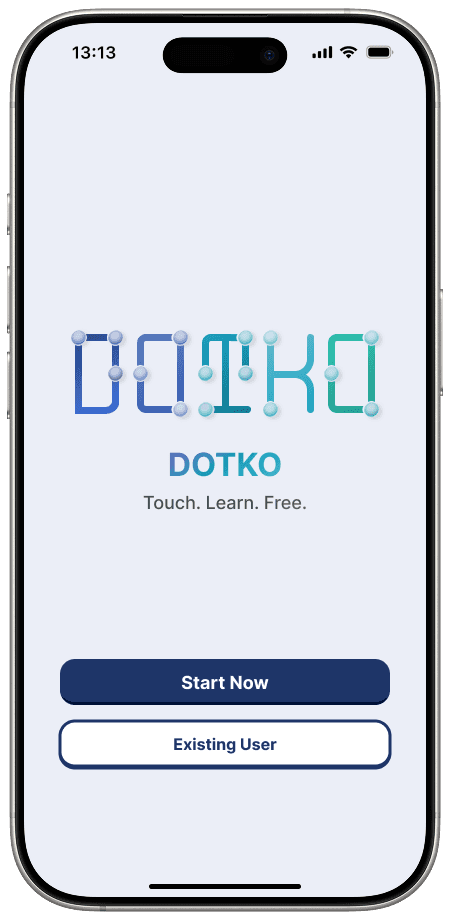
Register and login page
The Core Challenge
The Core Challenge
The primary UX challenge was driving long-term user retention for an educational accessibility tool. Learning Braille can easily become dry or repetitive, so we needed to figure out how to keep users continuously motivated to expand their knowledge without feeling overwhelmed by the learning curve.
To solve this, we focused on transforming passive learning into an interactive, multi-sensory experience. The goal was to build engaging features like gamified progress tracking, touch-simulated interactions, and real-time feedback that make exploring Braille feel natural, fun, and highly intuitive for both sighted and visually impaired users.
To solve this, we focused on transforming passive learning into an interactive, multi-sensory experience. The goal was to build engaging features like gamified progress tracking, touch-simulated interactions, and real-time feedback that make exploring Braille feel natural, fun, and highly intuitive for both sighted and visually impaired users.
Additionally, balancing accessibility compliance with immersive design required deep iteration. We had to ensure that interactive mechanics and clean visual aesthetics worked seamlessly alongside tactile feedback cues, creating an inclusive digital ecosystem that encourages daily practice.
Additionally, balancing accessibility compliance with immersive design required deep iteration. We had to ensure that interactive mechanics and clean visual aesthetics worked seamlessly alongside tactile feedback cues, creating an inclusive digital ecosystem that encourages daily practice.
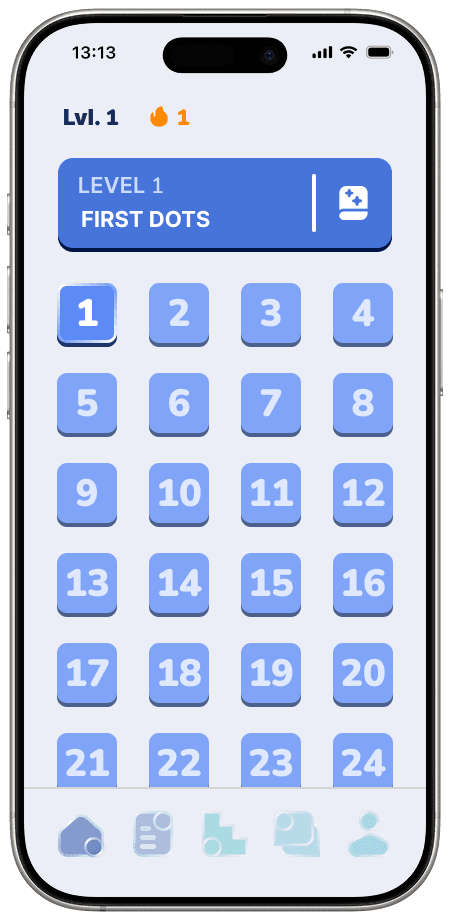


5 main page of the app
The Result & Reflection
The Result & Reflection
The final product successfully bridges cutting-edge computer vision with a multi-sensory educational suite. By combining SwiftUI for smooth interface performance with a lightweight YOLO object detection model, Dotko enables real-time Braille recognition directly through the camera feed on low-power devices, giving users instant, highly reliable translations.
The final product successfully bridges cutting-edge computer vision with a multi-sensory educational suite. By combining SwiftUI for smooth interface performance with a lightweight YOLO object detection model, Dotko enables real-time Braille recognition directly through the camera feed on low-power devices, giving users instant, highly reliable translations.
On the experience side, we successfully transformed traditional learning into an interactive ecosystem. Features like Braille Puzzle, Flashcards, and Letter Guessing games gamified the retention process, allowing users to move from simple character search to hands-on tactile practice seamlessly.
On the experience side, we successfully transformed traditional learning into an interactive ecosystem. Features like Braille Puzzle, Flashcards, and Letter Guessing games gamified the retention process, allowing users to move from simple character search to hands-on tactile practice seamlessly.
This project reinforced the importance of balancing complex AI pipelines with intuitive design. Harnessing deep learning for real-time camera processing taught me how backend technology directly shapes front-end accessibility, proving that thoughtful UI choices are essential for turning sophisticated computer vision into an empowering everyday tool.
This project reinforced the importance of balancing complex AI pipelines with intuitive design. Harnessing deep learning for real-time camera processing taught me how backend technology directly shapes front-end accessibility, proving that thoughtful UI choices are essential for turning sophisticated computer vision into an empowering everyday tool.
A short video introducing the app


© Mankin Portfolio | Created by Mankin
Made in Framer
© Mankin Portfolio | Created by Mankin
Made in Framer
© Mankin Portfolio | Created by Mankin
Made in Framer